Chat de voz com desconhecidos — grátis, sem vídeo.
Fale com alguém agora
Uma chamada de voz privada com uma pessoa real. Sem câmera, nada é gravado.
Conversar com
- Seja respeitoso
- Só maiores de 18
Vamos pedir seu microfone primeiro. Nada é gravado.
Voice chat on HearMe Chat is a free, mic-only call with one stranger at a time, not recorded and with no video. No account needed, 18+ only, and Report and Block in every call.
HearMe Chat is a free, anonymous voice and text chat with strangers — no video, no sign-up, 18+, moderated.
Por HearMe Chat · Publicado · Última atualização
How voice chat on HearMe Chat compares
| HearMe Chat | Omezy | StrangerLine | OpenTalk | |
|---|---|---|---|---|
| Video | Never. A call only asks the browser for a microphone | A separate video queue beside text and voice | One of three modes: text, voice or video | Its homepage leads with video, beside text and voice |
| Voice | A live call with one person, browser to browser | A voice queue, marked 'New' on its homepage | Live voice calls, and voice notes during a chat | A voice tab; it says you can 'switch any time' |
| Sign-up to start | No. Confirm you are 18+, then tap the microphone | 'Start anonymously in one click'; signing in drops 'the limits' | 'No sign-up' | 'No account, no download, no credit card' |
| Recording | Not recorded. A report sends the last 60 seconds of the other person's audio for review | Its privacy policy: video 'is not continuously recorded by default' | Not stated on the pages we read | Its privacy page: 'We do not record or store video or audio from your chats' |
| Moderation, in its words | Reports are reviewed by a person | 'Chats are monitored'; explicit video blurred automatically | 'AI filtering plus human moderators', 'Moderated 24/7' | 'AI & human moderation' |
| Age | 18+ only | 18 or older (its terms) | '18+ only' | For users aged 18 and over (its privacy page) |
From each site's own public pages, read on 30 October 2026 in a phone browser; we did not chat on any of them. 'Not stated' means the pages we read do not say. How we read them is on each comparison page.
Perguntas frequentes
Is voice chat with strangers free on HearMe Chat?
Yes: guests can make unlimited voice calls with no account and no time limit, and Premium only adds filters, priority in matching and a badge.
Is there video in voice chat on HearMe Chat?
No: the site only requests your microphone, there is no camera mode to switch on, and the other person cannot see you.
Do I need an account, an app or a phone number?
No: it runs in the browser on Android, iPhone and desktop, you never give a phone number, name or email to start, and a free account is optional and only adds friends and DMs. The other person hears your voice and sees a nickname, an avatar and one shared interest tag if you overlap, never your name, number or face.
Is voice chat safe and moderated?
Every call is private, Report is one tap and sends the last 60 seconds of the other person's audio to a review queue, bans hold by account, device and network, and the site is 18+ only. If a call feels wrong, tap Next to move on, or Block to stop being matched with that person again.
Does voice chat with strangers work on a phone?
Yes. It runs in the browser on Android and iPhone with no app, and an audio-only call uses far less mobile data than a video call would.
How does random voice chat work?
Open the voice page, pick a nickname, tick 18+ and tap Call. You wait in a queue and are paired with someone who picked one of your interest tags, or with the next person waiting once 20 seconds pass without one; every match is a real person, never a bot, and the call connects browser to browser. Tap Next when it is done.
Are calls recorded or listened to by anyone else?
No: every 1:1 call is private and nothing is uploaded, and only a tap on Report on the web sends the last 60 seconds of the other person's audio for review; the clip is deleted after 7 days unless a moderator confirms child safety or under-18, then it is kept for a year.
Can I talk to the same person again?
For 60 seconds after a call ends either of you can tap Reconnect, and after that a friend request, with both of you signed in, keeps the line open.
Can I choose country, gender or language?
Voice matching uses your interest tags. The country and gender filters are Premium preferences applied when someone matching is available, and matching is not sorted by language.
How many people are online right now, and what if nobody is free?
The chip at the top of this page is the live count; when it says Quiet now nobody is waiting, so try text chat instead or tap 'Ring me when someone's here' to get a notification when a person arrives.
Nobody can hear me, or I hear an echo. What now?
Check that the browser allowed the microphone and that Mute is off; an echo means your microphone is picking up your speaker, and earphones fix it.
Is this like Omegle without the camera?
Yes in the loop, one stranger and a tap on Next, with the camera removed at the code level and a live voice call in its place; the comparison pages set it beside other sites.
How a random voice call works, step by step
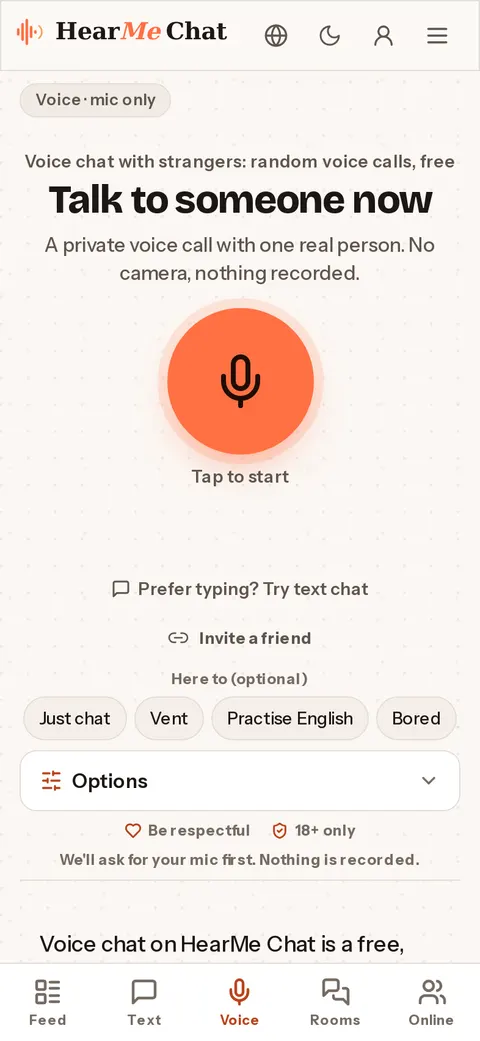
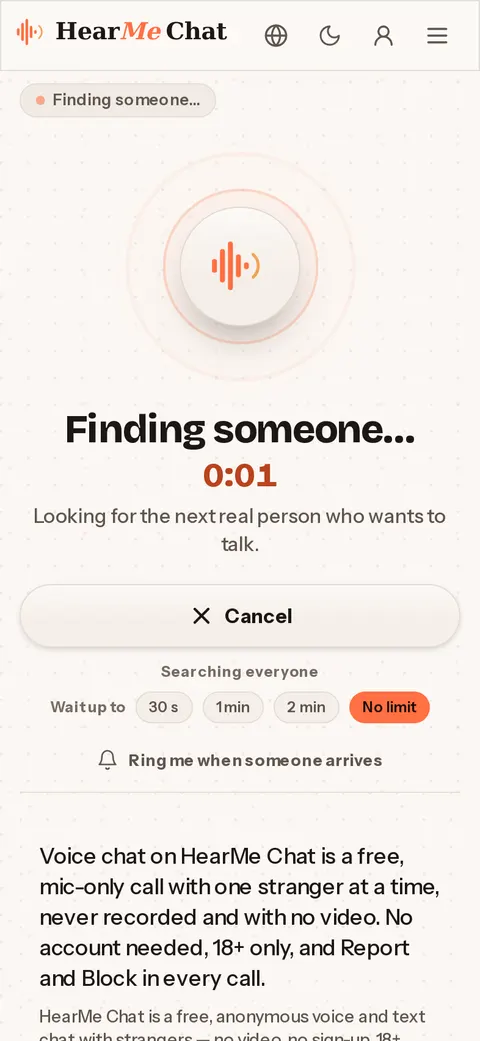
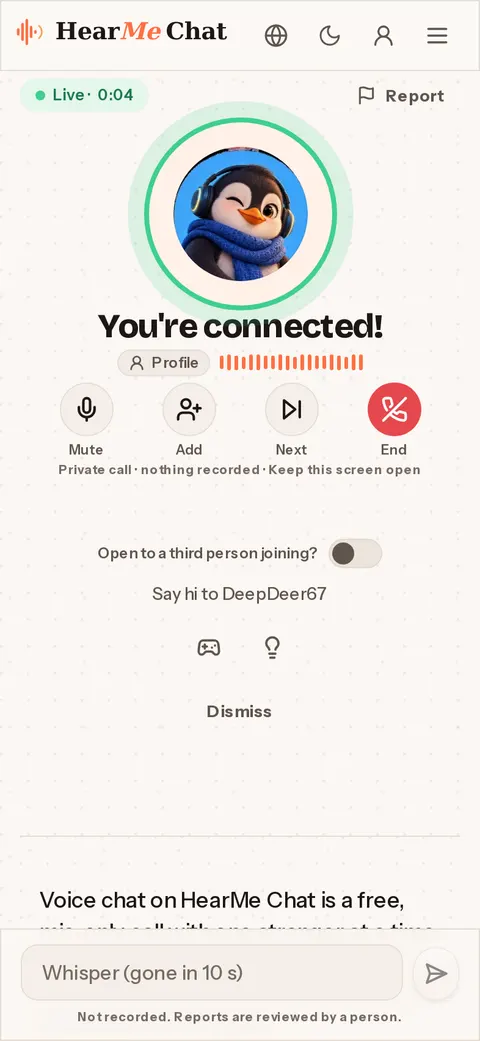
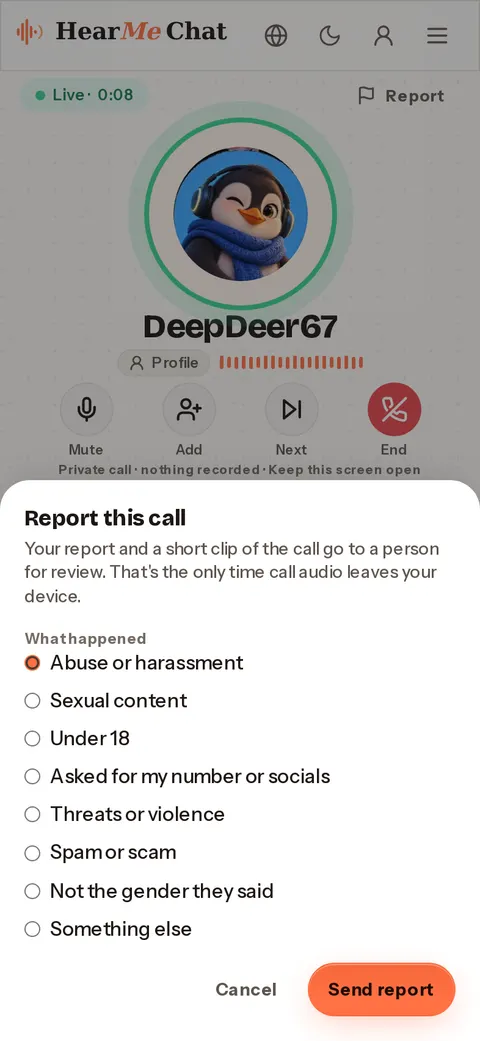
This is what a voice call with strangers looks like on a phone. The screenshots come from a real call between two of our own test browsers on 30 October 2026, not from anyone's real call. Nothing in them is mocked up; counts and wait estimates from the test system are hidden, because they are not real.
- Open voice chat. The first time, you confirm you are 18 or over. Then tap the microphone; the browser asks for it, not for the camera.
- You wait in a queue, not a list. For the first 20 seconds the matcher looks for someone who picked one of your interest tags, then takes the next person waiting. You can set how long to wait, or ask to be rung when someone arrives.
- Someone is there and you are live: their nickname and avatar, a call timer, and Mute, Add, Next and End. Whisper sends a line of text that disappears after 10 seconds.
- Report is at the top of every call. It sends the reason you pick and the last 60 seconds of the other person's audio to a person for review. Block stops you being matched with that person again.
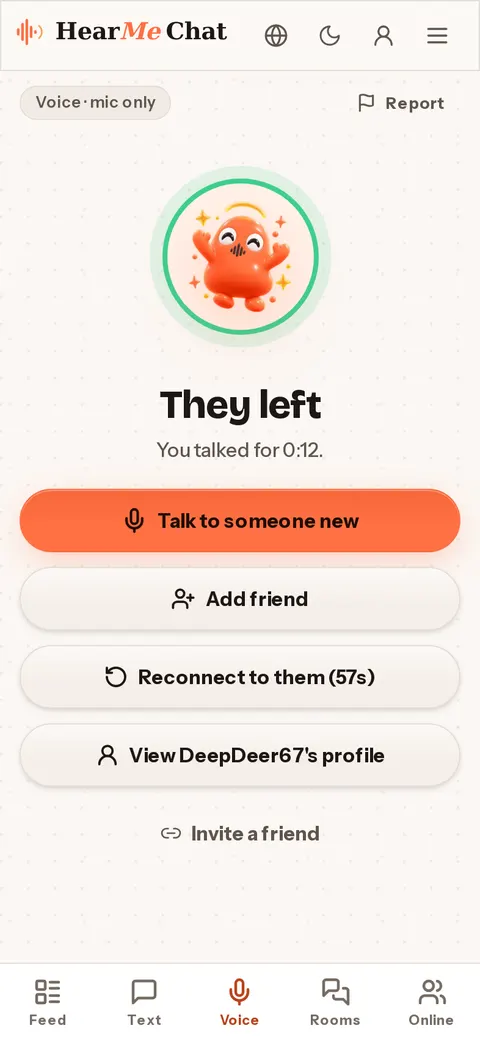
- When the call ends you can talk to someone new, reconnect to the same person within 60 seconds, or add them as a friend if you both have a free account.
Voice calls on HearMe Chat, by the numbers
These figures come from our own servers for the seven days 23–29 October 2026 (India time). They count every call that started, short ones included. Nothing is estimated; the daily count (205 on average) is rounded to the nearest 50.
| Voice calls | |
|---|---|
| Calls started a day | about 200 |
| Busiest hours | midnight to 05:00 India time |
| Typical wait to be matched (median) | about 5 seconds |
| 9 in 10 matches made within | about 30 seconds |
In the daytime, India time, far fewer people are calling. If the queue is quiet, set a longer wait or ask to be rung when someone arrives.
Safety on a voice call: 18+, Report, Block and a person
- HearMe Chat is for adults only. You confirm you are 18 or over before your first call, and an under-18 answer blocks the device for 7 days.
- Report and Block are in every one-to-one call. Block stops you being matched with that person again.
- Reports go to our moderation queue and are reviewed by a person. A report from a web call carries the last 60 seconds of the other person's audio; the clip is deleted within 7 days unless a moderator confirms the report as child safety or under 18.
- Apart from a report clip, calls are not recorded, uploaded or transcribed, and nobody else can join or listen.
The full rules are in the community guidelines and child safety pages.
Random voice chat with strangers, one at a time
Random voice chat on HearMe Chat is a queue, not a list. Tap Call; the browser asks for your microphone once and nothing else. For the first 20 seconds the matcher looks for someone who picked one of your interest tags, then for the next person waiting. The call connects browser to browser, voice only, and if a direct connection fails a relay carries the audio without storing it. During the call you can mute, send a whisper, tap Next or leave; if your network drops, the call tries to reconnect for 30 seconds before giving up. When it ends you can reconnect to the same person for 60 seconds or move on. There is no daily limit and no time limit on a call, with or without an account. Text is on the text chat page; this one is voice.
Anonymous voice chat: what the other person gets
In an anonymous voice chat the other person hears your voice and sees three things: a nickname, an avatar and one shared interest tag if you overlap. Not your name, not a photo, not your number, and nothing from any other call you have had here. There is no profile card to inspect before you speak. A 1:1 call is between the two of you and nobody else: it is not listed anywhere, nobody can join it, and nobody can listen in, free or Premium. Calls are not recorded, uploaded or transcribed; the one exception is Report on a web call, which sends the last 60 seconds of the other person's audio to a review queue. There is no public voice on HearMe Chat: rooms are text only.
Voice calls on a phone, with no app
Voice chat runs in the browser on Android and iPhone; there is nothing to install, and 'Add to home screen' puts HearMe Chat next to your apps if you use it often. An audio-only call uses a fraction of the mobile data a video call would, which is why it works on a mid-range phone on mobile data. Use earphones if you can: without them your microphone picks up the other person's voice and sends it back as an echo, and any wired or wireless pair fixes it. Calls connect people across countries, so a caller may be in a very different hour from you; the country pages, such as the USA, the UK and India, show the local hours and languages, and the India page goes deeper on Hindi, English and mobile data; if you are here to speak English with someone patient, practise English with strangers explains how people use the interest tags for that.
Sobre Voice chat with strangers: random voice calls, free
HearMe Chat is voice chat with strangers: a live call with one person, using only your microphone. There is no camera on the site at all, no account to create, and the call is not recorded. You tap Call, wait for the next person, and someone is there. When it is done you tap Next. Every call is private: nobody else can join it or hear it.
Voice chat with strangers without a camera
Most 'random chat' sites are video sites. The camera is on by default, the first thing you see is a face, and the first thing you do is judge. HearMe Chat removes the camera at the code level: the site only ever asks the browser for your microphone. There is no video toggle, no 'turn on cam' button, and no way for the other person to see you even if they wanted to.
What is left is a phone call with a stranger. You hear a voice, they hear yours, and both of you have a nickname and an avatar on screen. It is a smaller, calmer thing than a video call and it lasts longer, because nobody is performing.
Every call is private, by default and for everyone
A 1:1 voice call on HearMe Chat is between the two of you and nobody else. It is not listed anywhere, nobody can join it, and nobody can listen to it. That is true for every call, free or Premium; privacy is not something you pay for here, and there is no daily limit and no time limit on a call, with or without an account.
Most voice-chat sites treat privacy as an upgrade: free users are broadcast, paying users are not. HearMe Chat does not do that, for a simple reason. A call you know might be overheard is a different call. People hold back, perform a little, avoid the thing they came to say. The whole point of talking to a stranger is that you can say it, so the call has to be closed. It also keeps the incentive honest: if privacy were the paid perk, the site would have a reason to make free calls feel exposed. Instead the paid tier buys filters, priority in matching and a badge, and the thing that matters most, being alone on the line with one other person, is the same for everyone. There is no public voice mode at all: rooms are text only.
Nothing is recorded
Voice calls are not recorded, uploaded or transcribed while they happen. The audio goes from your microphone to the other person and nowhere else.
The one exception is a report. If either of you taps Report on the web, only the last 60 seconds of the other person's audio is sent, with the reason, to a review queue. The clip is deleted after 7 days unless a moderator confirms the report as child safety or under 18; then it is kept as evidence for one year. Reports from the Android app carry no clip. That is what makes Report on a voice call mean something. The details are in the terms.
In short
A call is a live conversation between two people, the way a phone call is. Only a report sends anything anywhere.
Auto-next and the small things
- Auto-next: a toggle under Options on the voice page. When the other person ends the call, you are put straight back in the queue without tapping anything. It turns a series of calls into one session.
- Recent calls: the last people you talked to, kept on this device only, under Options.
- Interest tags apply to voice matching as well as text, and so does the Premium country filter.
Before the call
- Allow the microphone when your browser asks. It is asked once, and it is the only permission a call needs. If you tapped Block by accident, open the site settings in your browser and switch the microphone back on.
- Find a quiet room, or at least a quiet corner. Background noise is the thing strangers mention most.
- Check your connection. Wifi is steadier, but an audio-only call is light enough to work on mobile data. If the call will be a long one, keep an eye on the battery: there is no time limit, and nobody will cut it short for you.
- Choose a nickname and, if you like, one or two interest tags. Tick the 18+ box, then tap Call.
During the call
When the call connects, the screen shows the stranger's nickname and avatar, plus one line if you share an interest tag. Neither of you sees where the other is: your country is used for matching and is never shown. A handful of controls cover everything else, and each does one thing, immediately.
| Control | What it does | When to use it |
|---|---|---|
| Mute | Stops your microphone; the other person sees that you are muted rather than guessing the line dropped | A cough, a doorbell, a loud room |
| Whisper | Sends a short line that appears on their screen for ten seconds, then disappears | A song name, a handle, an opening line |
| Next | Ends the call and puts you straight back in the queue | When the conversation has run its course |
| Leave | Ends the call and stops your session | When you are done for now |
| Report | Sends the last 60 seconds of the other person's audio to a review queue | Abuse, pressure or anything that breaks the rules |
When nobody is free
Sometimes you tap Call and nobody is waiting. HearMe Chat does not fill that gap with a recording, a bot or an invented caller: it tells you the queue is quiet, and the number of people online at the top of the page is the real one, even when it is small. The site is worldwide, so a quiet queue usually reflects the hour more than the site. For hours that tend to feel livelier, the late-night chat page is written for exactly that.
Tips for voice chat with strangers
Use headphones if you can. Without them your microphone picks up the other person's voice and sends it back, and the echo makes both of you talk over each other. Any wired or wireless earphones fix it.
Say something in the first three seconds. Silence on a voice call feels much longer than silence in text. 'Hey, where are you calling from' is enough. If you cannot think of anything, send a whisper instead and let them go first.
Do not worry about your accent. Many calls on HearMe Chat are between people in different countries, and many people are here specifically to practise speaking English with someone patient. Slower is fine. Asking someone to repeat is fine. If you want a particular language, say so in the first sentence, because matching is worldwide and not sorted by language.
Leave when you want to. A call that ends after four good minutes is better than one that drags for twenty. Next is not rude here; it is the whole design.
Who a call suits, and what it is not
A call is the better choice for people who find typing slow or tiring, who think more clearly out loud, or who are shy typists happier talking than writing, because a voice fills in the tone a message loses. Your voice is still your voice, so if being identified worries you, text chat is the quieter option. Night owls use calls for the hours when everyone they know is asleep.
It helps to be clear about the limits. A call is not a replacement for a phone line: you cannot ring someone's number, and nobody can ring yours. It is not a way to exchange numbers, and a push to swap them in the first minute is a good reason to tap Next. It is not a dating line and it is not a crisis service, and it is not for under-18s, because HearMe Chat is 18+ only.
After the call
When the call ends you land on a plain screen with a few options. You can reconnect to the same person for 60 seconds, tap Next to be matched again, or leave. If you want a repeat of a good conversation, adding a friend needs both of you to be signed in with a free account, and it is never required.
If a call went badly, Report and Block are there, and Block stops you being matched with that person again. If it went well, the best thing you can do is say so before you hang up.
Rooms, if 1:1 is too much
If a one-on-one call feels like a lot, rooms are the gentler version: a text room with no host, where you can read for an hour without typing and nobody will ask why.
Other voice chat sites, compared honestly
We read three other sites' public pages on 30 October 2026. All three offer voice calls, and all three also offer video, which HearMe Chat doesn't.
- Omezy comparison: text, voice and video, each with its own queue. Its homepage marks voice as new and says signing in drops the limits on anonymous use.
- StrangerLine comparison: text, voice or video with no sign-up, plus voice notes and a way to message someone after the chat ends.
- OpenTalk comparison: text, voice and video with no account. Its homepage leads with video, and it also has an Android app.
If what you want is a voice call with a stranger and nothing else, with no camera anywhere on the site, that is the one thing HearMe Chat does differently. Each comparison page says what we read and when.
Do blog
How to Talk to Strangers Online Safely
How to talk to strangers online safely: what to say first, how to read the room, how to leave politely, and when to use Report and Block on HearMe Chat.

Best Voice Chat Apps Compared (2026)
Eleven free voice chat apps for talking to strangers, one person or a room, checked on their own pages in November 2026, with where others do better.

Text vs Voice Chat: Which Is Better With Strangers?
Voice carries tone and moves fast; text is easier to start and to stay in. What our October 2026 logs show about both, and when to pick each with a stranger.
Quando você quiser
Sem cadastro. Sem câmera. Grátis pra começar.